
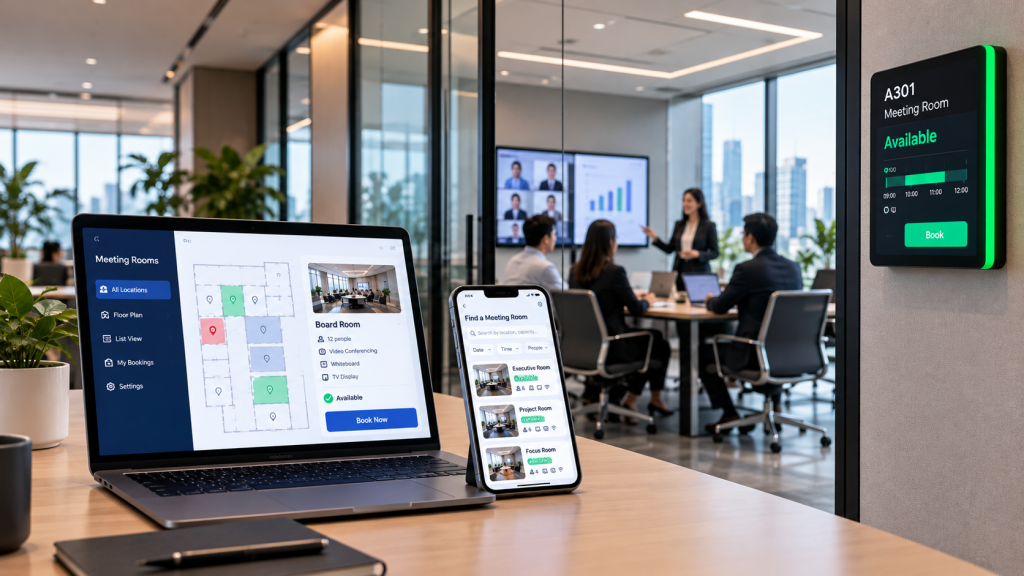
Booking a meeting room should take seconds. In many offices it still means checking several calendars, walking the floor and hoping the room is really free. Hybrid schedules make demand harder to predict, so a room booking system is now core workplace infrastructure, not a nice extra. Whether employees merely tolerate a tool or truly rely on it comes down to a handful of features. Here are the ten that matter most, and what to check before you commit to any meeting room booking software.
When a Room Booking System Becomes Worth It
Not every office needs dedicated software. With only a handful of rooms, little competition for them and no call for approvals, check in, door panels or usage reports, a shared calendar often does the job. Where people find space easily and clashes are rare, another platform can add more admin than it removes.
The picture changes once any of these apply:
- Rooms are spread across several floors or offices
- The arrangement of room booking is messy
- Regular no shows leave the calendar looking full while rooms sit empty
- Premium spaces such as boardrooms need restricted access
- Assistants routinely book on behalf of senior staff
- You want the same booking experience across calendars, web and room panels
If several of these sound familiar, the features below are the ones to test. For a wider look at vendor selection, see our meeting room booking system buyer’s guide.
The Top 10 Room Booking System Features
A long feature list looks impressive in a demo but says little about daily use. What counts is whether the platform suits the way people already schedule meetings, and whether administrators can set sensible rules. It also needs to give facilities teams information they can act on. These ten features are the ones worth testing.
1. Calendar Integration That Fits The Working Environment
If employees must reserve a room in one tool and send the invitation from another, many will stop using the booking system altogether. That is why calendar integration comes first. Bookings should stay in step, in both directions, with whichever calendar environment your organisation runs, whether Microsoft Exchange, Microsoft 365 or Google Calendar.
Keep two ideas apart that vendors often blur together:
- Calendar synchronisation governs the room itself and whether it is free
- Online meeting integration with Teams, Zoom or Webex shapes the meeting experience
Ask each vendor which calendar platform your deployment will sync with, and which system holds the master record. Also ask what happens to the room when an organiser moves or cancels a meeting.
ESI-TIK Room Booking System lets employees schedule through Teams, Outlook, Zoom , Webex or Google Meet with room status synced in real time, depending on the integrations in the deployment.
2. Booking Channels Employees Will Actually Use
A room booking system succeeds or fails on usage, not specifications. When bookings bypass the system, the reports are incomplete and informal habits carry on, such as holding a room with a quick message to a colleague. Match each channel to a real working habit, then check the detail behind it:
- Web and mobile: for planned meetings and browsing floor plans. Check secure sign in, live availability and a short booking flow.
- Calendar add ins: for staff who live in Outlook or Google Calendar. Check two way sync and how conflicts are resolved.
- Messaging or AI assistants: for quick requests in everyday language. Check the supported languages, identity controls and which requests the assistant can complete end to end.
- Booking panels: for walk up booking at the door. Check at a glance status, ad hoc reservations and remote device management.
- Voice or room devices: for hands free, in room tasks. Check compatible hardware and whether the feature is standard or an optional extra.
Before you compare prices, confirm which of these channels are included and which need extra modules or hardware.
ESI Asia’s AI Booking Agent takes requests through WhatsApp in any language. In one conversation it finds a suitable space and books both the room and the Teams meeting.
Watch how an intelligent booking platform works in practice: ESI-TIK Intelligent Room Booking & Workplace Platform
3. Real Time Availability, Smart Search and Floor Plans
Finding the right room matters as much as reserving it, especially in larger offices. Employees should be able to narrow the choice by capacity, equipment, floor or building, then see the options on an interactive floor plan rather than a list of room codes.
Useful filters include projectors, smartboards, cameras and video conferencing kit. The best interfaces let people book straight from the floor plan and show a clear room profile, so nobody arrives at a four person huddle space with a team of ten.
4. Approval Workflows and Role Based Permissions
A boardroom, a training suite and a project room reserved for one department each need different rules. The system should apply those differences automatically. Administrators should step in only where a room genuinely needs oversight.
Look for:
- Approval steps for premium, restricted or high demand rooms
- Distinct roles for administrators, assistants and general staff
- Usage policies such as booking limits, quotas and buffer times between meetings
- Rules that can vary by room, location or user group
A well configured policy layer means administrators spend time on exceptions, not on approving routine bookings.
5. Delegated, Recurring and Batch Booking
Some people book on behalf of others as part of their job. Executive assistants need delegated booking, with a clear record showing who created each reservation and for whom. Team leads need recurring bookings, and sometimes custom series that skip holidays or change rooms midway.
Training and events teams face a bigger task: loading a full term of sessions or a conference schedule. Batch booking and reservation import save hours of manual entry here. Ask vendors to show exactly how series and bulk reservations are created, edited and cancelled.
6. Check In and No Show Auto Release
A calendar can look fully booked while half the rooms sit empty. These ghost meetings quietly cut real capacity. Check in solves this by asking the organiser to confirm the meeting is happening.
Strong systems offer a choice of check in methods and a visible attendance status. They also let people check out early. When nobody checks in within the configured window, the booking is cancelled and the room returns to the schedule, with clear notice to the organiser and to anyone waiting for the space. Ask which check in methods and no show controls are supported, and how the release window is set.
In ESI-TIK, every meeting invitation carries a PIN code and QR code for check in and check out.
7. Booking Panels and Wayfinding at the Room
The booking does not end in the calendar. At the door, a room panel should show at once whether the space is free, booked or about to start. It should also let people act there and then: reserve an empty room, check in, extend a meeting or release it early. QR code and access card workflows add speed and security.
Wayfinding matters in large or unfamiliar offices, guiding employees and visitors to the right room. For organisations with several sites, ask how room booking panels are monitored and managed centrally, so a faulty screen is spotted before it causes confusion.
8. Utilisation Analytics and Reporting
Once bookings, check ins and room signals flow through one platform, the data starts to earn its keep. Useful dashboards break down booking volume, usage rates, check in percentages, no show rates and early releases by room, floor or building.
These figures support real decisions:
- Spotting rooms that are consistently underused
- Testing whether demand is shifting towards smaller collaboration spaces
- Planning future office space with evidence rather than guesswork
- Linking room use to energy and ESG reporting
Confirm which reports and exports come as standard. The data should also be clear enough for the facilities and management teams who act on it, not only for IT.
9. Room Automation and IoT Integration
Room booking, AV control and IoT monitoring have long been bought and run separately. In a smart meeting room they work as one, and the booking becomes the trigger that prepares the space:
- Lighting, displays, curtains, air conditioning and AV equipment are ready as the meeting starts
- Occupancy and environmental sensors track room use and comfort
- Central monitoring flags an offline panel or device before anyone walks in
- Personal profiles bring back the organiser’s preferred room settings
What a room can automate depends on the system design and the integrations installed, so check this against your own rooms. ESI-TIK links booking data with AV over IP room control, recognising the organiser and restoring the setup they used last time. Across the estate, IoT centralised management gives facilities teams real time alerts and proactive maintenance.
See one touch room automation in action: ESI-TIK AI Meeting Room Booking, Room Automation and Centralised Management
10. Multiple Location Management and Enterprise Readiness
For organisations with more than one site, the platform should handle several buildings, floors and offices from a single console, with reporting that can be split by location. Confirm whether multiple location management is included or priced separately.
Beyond that, the questions that separate a demo from a dependable deployment are operational:
- Authentication and role based access
- Audit history of bookings and changes
- Language support for every user group
- Data retention and deployment options
- Implementation services, training and ongoing support
These details rarely appear on a feature list, but they decide how much effort the system will take to run over time.
Please also read How to Choose the Best Meeting Room Booking System for more information.
Room Booking Software Features at a Glance
|
Feature |
Problem it solves |
What to confirm with vendors |
|
Calendar integration |
Double entry and conflicting bookings |
Which calendar platform is authoritative |
|
Booking channels |
Low adoption and shadow booking |
Which channels are standard and which cost extra |
|
Search and floor plans |
Time wasted finding a suitable room |
Filters for capacity, equipment and location |
|
Approvals and permissions |
Uncontrolled use of premium rooms |
Whether rules vary by room or user group |
|
Delegated and batch booking |
Manual work for assistants and trainers |
How series and bulk imports are handled |
|
Check in and no show release |
Ghost meetings |
Supported check in methods and release timing |
|
Panels and wayfinding |
Confusion at the room door |
Panel actions and remote device management |
|
Analytics |
Guesswork in space planning |
Available dashboards, reports and exports |
|
Room automation and IoT |
Manual room setup and hidden device faults |
Which integrations are included |
|
Multiple location management |
Fragmented administration |
Security, audit and deployment options |
How to Prioritise Features in a Meeting Room Management System
You rarely need all ten features on day one. Begin with the problems you actually face, then map out how the platform should grow.
- Map your calendar environment. Confirm which platform employees use to send meeting invitations today.
- Measure booking behaviour. Record no show rates, peak hours and the rooms behind most conflicts.
- Set governance needs. List the rooms that need approval, restricted access or delegated booking.
- Look past the headline price. Budget for the whole deployment: licences, door panels and mounting, sensors and gateways, AV integration, setup, training and support.
- Plan the next stage. Decide whether panels, analytics, automation and IoT belong in phase one or later.
For simple scheduling, a lower cost tool may be all you need. Where automation, hardware management and multiple offices are involved, an integrated platform usually delivers more value.
ESI-TIK is a Hong Kong developed platform that combines room booking with optional hot desking, visitor management, AV and IoT modules within ESI Asia’s workplace and facilities management platform. You can see every feature above working together at the ESI Experience Centre in Kwun Tong.
FAQs About Room Booking Systems
What is the difference between room booking software and a meeting room management system?
Room booking software focuses on reserving spaces: availability, search and scheduling. A meeting room management system goes further, adding governance, check in, panels, analytics and often control of the room’s devices. Many modern platforms combine both, so compare the full scope rather than the product label.
How long does it take to implement a room booking system?
A software only rollout connected to an existing calendar can move quickly. Adding room panels, sensors or AV integration adds time for installation, testing and training. Ask vendors for a phased plan that starts with core booking and adds hardware in later stages.
Should a room booking system also manage hot desks and visitors?
It often makes sense. Hybrid offices share the same pressures across rooms, desks and reception, and one platform gives a single view of how the workplace is used. Check whether desk booking and visitor management are included modules or separate purchases.
Does room booking software work in languages other than English?
Many platforms support several interface languages, and AI assistants can now understand requests in multiple languages. For Hong Kong offices, confirm support for Traditional Chinese and whether the assistant handles mixed language requests.
How can we improve adoption after launch?
Connect the system to the calendar employees already use, put panels outside the busiest rooms and switch on no show release so people see the benefit quickly. Share usage reports with team leads and review booking policies once the first months of data come in.
Stay Connected with ESI
Never miss an ESI update! Subscribe to our newsletter by sharing your email address via WhatsApp.
Subscribe via WhatsApp